Check List of National Parks: Printable Checklist
Make a printable checklist of the 63 national parks, tick the ones you have visited, and print it or save it as a PDF.
Recent
Your last 10 settings, saved only in this browser. Nothing is uploaded.
This check list of national parks is a printable sheet with one row per national park, a checkbox beside each name, and the state where it sits. This tool makes a US national parks checklist in your browser for free, with no sign-up. Choose your settings, press “Print / save as PDF,” and fill the sheet in by hand, or tick parks on screen as you visit them.
The default list is the 63 national parks. You can also list every National Park Service site in one state. Each tick marks a park as visited, and a counter reads how many of the 63 you have done. Everything runs on your device, and nothing you enter is sent anywhere.
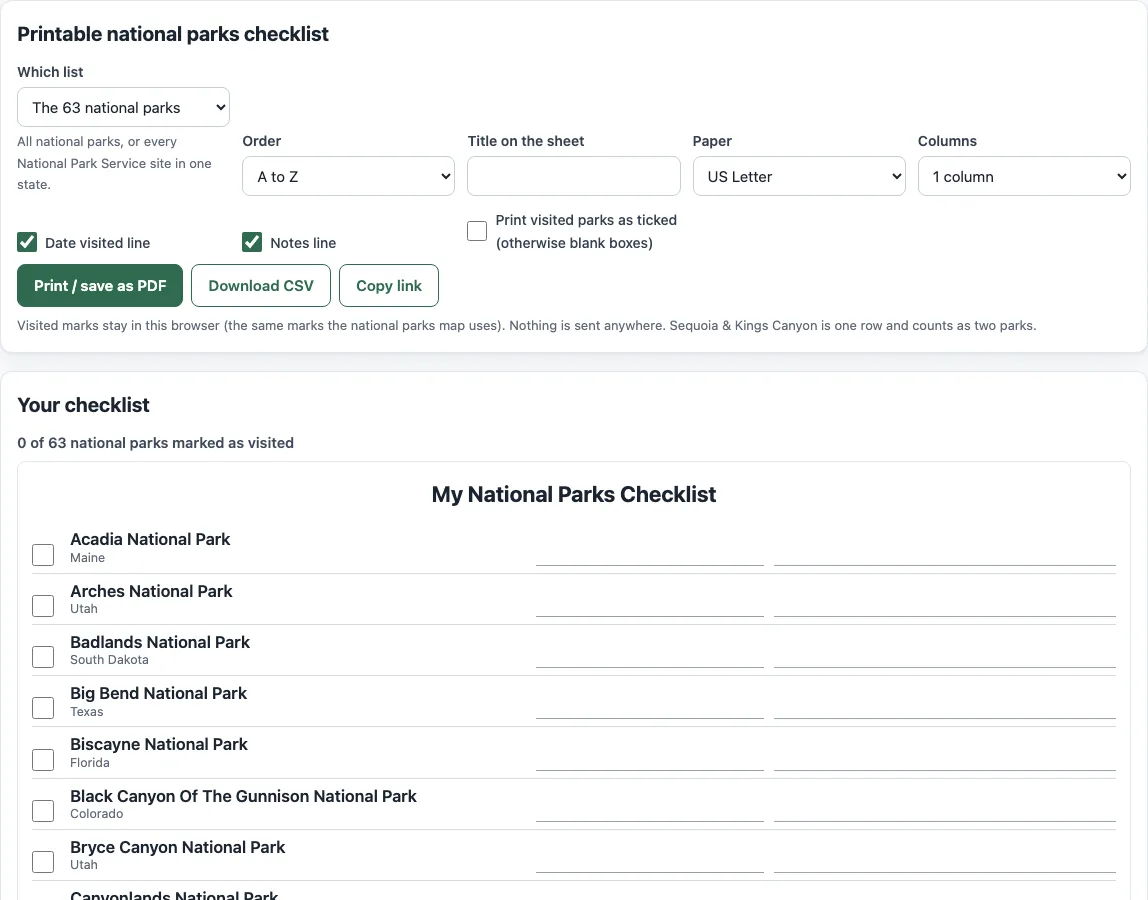
How to use the printable national parks checklist
- Under “Which list,” choose “The 63 national parks.” To list every site in one state, choose “All NPS sites in
” and pick your state. - Under “Order,” choose “A to Z” or “By state, then A to Z.”
- Type a title under “Title on the sheet,” or keep the default, “My National Parks Checklist.”
- Under “Paper,” choose US Letter or A4.
- Under “Columns,” choose 1 column or 2 columns.
- Turn the “Date visited line” and “Notes line” options on or off, depending on how much room you want.
- Tick the checkbox beside each park you have visited. The counter reads “N of 63 national parks marked as visited.”
- Press “Print / save as PDF.” To print a blank sheet for a family park hunt, untick “Print visited parks as ticked” first, then tick the boxes by hand.
Press “Download CSV” to get a file named national-parks-checklist.csv. It has columns for Visited, Park, State(s), Date visited, Notes and NPS page, and it opens in any spreadsheet program. “Copy link” keeps your settings in the address, so you can return to the same sheet. “Clear visited marks on this list” removes all ticks on the list.
What this tool produces may be printed, shared and used for any purpose, royalty-free and without credit, including in a classroom or in products for sale.
Is there a free printable national parks checklist?
Yes. The sheet is free to print, and you do not need an account. Choose US Letter or A4 under “Paper,” then press “Print / save as PDF.”
The printout contains only the sheet, with no buttons or page furniture, set to 12 mm margins. Choose Letter for a US printer and A4 elsewhere. Two columns put two rows side by side, which takes less paper. Turning off the date or notes line gives you a simpler sheet with more room for names.
How many national parks are on the list?
The list holds 63 national parks, but it has 62 rows. Sequoia & Kings Canyon shares one entrance and one fee, so it is one row on the checklist. It counts as two parks in the “N of 63” counter.
The National Park Service (NPS) lists 63 national parks and manages 433 individual units in total. The extra units include national monuments, historic sites, seashores and other units. The “63 national parks” figure covers parks only, while the state option adds the other units.
Based on the NPS unit data, the 63 parks sit in 30 states, American Samoa and the U.S. Virgin Islands. The same data gives these park counts by state: California 9 (counting Sequoia and Kings Canyon as two), Alaska 8, Utah 5 and Colorado 4. For a state-wide view that includes every unit, use “All NPS sites in
The list is sorted A to Z by default; “By state, then A to Z” groups the parks under state headings, which suits a road trip that crosses several states. A park in more than one state, such as Yellowstone, is listed under its first state in that order.
Only the sheet prints: the options, buttons and the rest of the page are left out. If you print often, keep the link from “Copy link”, which reopens the same sheet with the same options.
Frequently asked questions
Can I tick parks online and keep them?
Yes, in this browser. Your ticks are stored in your browser’s local storage, and nothing is uploaded. The national parks map on this site uses the same marks, so a park you tick here shows as visited there. If your browser blocks storage, the marks last only for the current session.
Can I print it with my visited parks already ticked?
Yes. Turn on “Print visited parks as ticked” before you press “Print / save as PDF.” If the option is off, the sheet prints with blank boxes.
Can I get a spreadsheet version?
Yes. Press “Download CSV” to get national-parks-checklist.csv. The file has empty “Date visited” and “Notes” columns for you to fill in, and it opens in any spreadsheet program.
Can I list all National Park Service sites in my state?
Yes. Under “Which list,” choose “All NPS sites in
Does it work on my phone?
The page is built for phone width, and ticking boxes works on a phone. Printing depends on your phone’s print menu, so check that you can print or save the sheet as a PDF before you need it.
Can I use the printable for commercial purposes or sell it?
Yes. You may print, share and use what this tool produces for any purpose, including in a classroom or in products for sale, such as printables in an online shop or print-on-demand books. The use is royalty-free and needs no credit. The one limit is that you may not copy the website or the tool itself as a competing service.
Related tools
- National parks map: see where each park sits before you plan a route.
- National parks list: read the full list of parks with their details.
- National park entrance fees: check the published fees before you visit.
- America the Beautiful pass calculator: compare the cost of a pass with the entrance fees you expect to pay.
- Senior national park pass calculator: see what the official senior pass page lists for eligibility and cost.
- Campgrounds near me: find campgrounds close to where you are.
- Sunrise and sunset calendar: plan early starts or evening walks at a park.