National Register of Historic Places Search
Look up any National Register listing by name or city, or list every place in a county or from one year.
Recent
Your last 10 settings, saved only in this browser. Nothing is uploaded.
The National Register search lets you look up places on the National Register of Historic Places, the official list of the Nation’s historic places worthy of preservation. You can filter by state, name or city, county, year listed, type, and a landmark flag, then read the results in a sortable table. The tool runs in your browser, is free, and needs no sign-up. Nothing you type is sent anywhere. Use it to check whether a building, site, or district is listed, or to see every listing in a state.
Every kind of listed property is in the data, so it works as a search of the national register of historic homes, churches, bridges and districts alike.
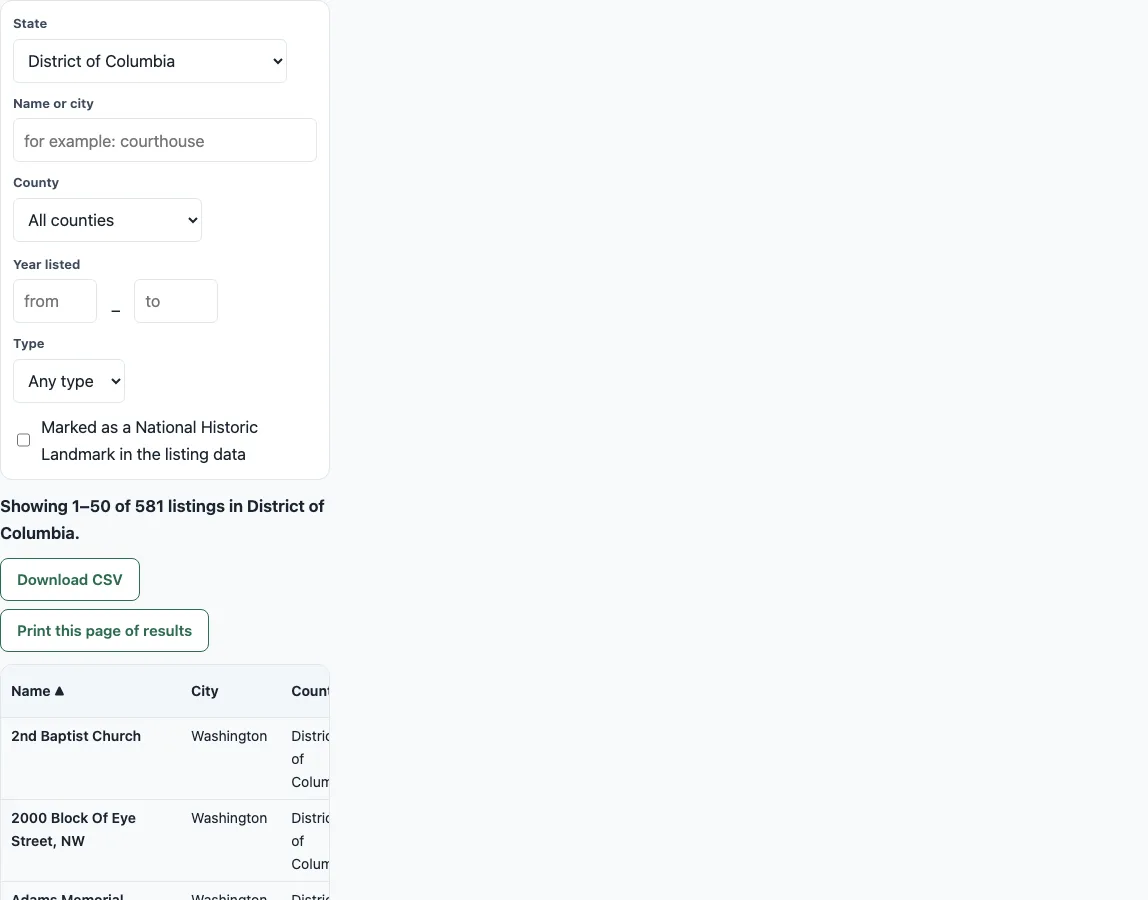
How to use the National Register search
- Open the State box. It starts on District of Columbia. Pick All states to search every jurisdiction, or choose one state.
- Type part of a place name or city in Name or city. Every word you type must appear in the name or city.
- Optional: choose a County, or enter Year listed from and to.
- Optional: choose a Type, or check Marked as a National Historic Landmark in the listing data.
- If you chose All states, the page loads one state at a time with a line such as “Loading
(N of 60)…”. Click Stop loading to pause it. - Read the line “Showing 1–50 of N listings in
.” Click a column header (Name, City, County, State, Year listed, Type, Ref #) to sort. Click a row’s Map link to see that place. - Use Previous page and Next page to move through results, 50 per page. Check the “Page X of Y” indicator.
Your settings stay in the page address, for example ?s=New York&q=grant, so you can bookmark a search. Click Download CSV to save every matching row. Click Print this page of results to print only the table on screen.
Results appear as soon as the state file loads; changing a filter updates the table at once.
What is the National Register of Historic Places?
The National Register of Historic Places is the official list of the Nation’s historic places worthy of preservation. The National Park Service (NPS) maintains it, and the National Historic Preservation Act of 1966 authorized it.
The list covers buildings, structures, districts, sites, and objects. In the data behind this tool, harvested on 2026-10-09 from NPS listings, there are 63,211 buildings, 4,730 structures, 2,765 districts, 1,505 sites, and 460 objects.
How do I look up a listing?
Choose the state, then type part of the name or the city. The tool matches every word you type against the name and city, ignoring capitals, accents, and punctuation.
For example, search “grant” with State set to “All states”. The results include General Grant National Memorial, listed in 1966 with reference 66000055.
How do I find all listings from a year?
Set Year listed from and to to the same year. The tool then shows only listings from that year.
Rows without a year are left out of year filters. Rows with an unknown year sort last when you click the Year listed header.
Is every National Historic Landmark in this list?
No. The NPS says over 2,600 National Historic Landmarks (NHLs) exist, but the data flags only 1,009 rows with the landmark flag. The flag is partial, so a landmark that is not flagged here may still be one.
Miami Circle is an example of a flagged landmark. It was listed in 2002 (February 5, 2002) and became an NHL in 2009.
Does listing mean I can visit?
No. Many listed places are private property, so being on the list does not mean the public can enter. Check before you plan a trip.
Can I download results?
Yes. Download CSV saves every row that matches your filters, not just the page you see. Print this page of results prints only the current page of the table.
How many listings are there?
The data contains 72,671 listings across 60 jurisdictions, which include the 50 states, District of Columbia, territories, and others. Some states have far more than others. New York has 4,807, District of Columbia has 581, and Delaware has 524.
Frequently asked questions
Does listing restrict what a private owner can do?
Listing places no federal restrictions on a private owner, according to the NPS FAQ.
Is this the same as the near-me page?
No. This tool searches by name, place, or year, not by distance. Use the near-me page to find places close to you.
What does Stop loading do?
When State is set to “All states,” the tool loads each state file in turn. Stop loading halts that process.
Where does the data come from?
The data is NPS National Register listings: 72,671 rows across 60 jurisdictions, harvested on 2026-10-09 and fetched per state from this site.
Why are some listings missing from a year search?
The year filter leaves out 246 rows that have no year in the data. Use the name or city search to find those listings.
Is what I type sent anywhere?
No. The search runs in your browser on the state files it loads from this site; your search words are only kept in the page address so you can bookmark them.
Are historic homes and other properties included?
Yes. The National Register lists properties of every kind, and most of the data is buildings (63,211 of 72,671 listings), many of them houses. Search a name or city and set “Type” to Building to look through the national register of historic properties for homes.
Related tools
- Historic places near me: Use this when you want historic places sorted by how close they are to you.
- National parks map: Use this to see national parks on a map.
- States visited map: Use this to mark the states you have been to.
- Travel itinerary template: Use this to plan the days of a trip.
- Campgrounds near me: Use this to find campgrounds close to you.
- Printable US map: Use this to print a map for marking the places you found.