Travel Itinerary Template
Fill in a day-by-day trip plan in your browser, with dates filled in from your start date, then print it or save it as a PDF.
Recent
Your last 10 settings, saved only in this browser. Nothing is uploaded.
A travel itinerary template is a day-by-day plan that lists where you go, when you go, where you sleep and your confirmation numbers. This free tool gives you one that you fill in online, with no sign-up. Type your trip into the page, and the dates fill in from your start date. Pick a road trip, national park trip or city trip style, plan 1 to 30 days, then print, save as PDF, share or download the plan as a spreadsheet file. Everything runs in your browser, and nothing you type is sent anywhere.
The printed plan has the same sections as the screen version.
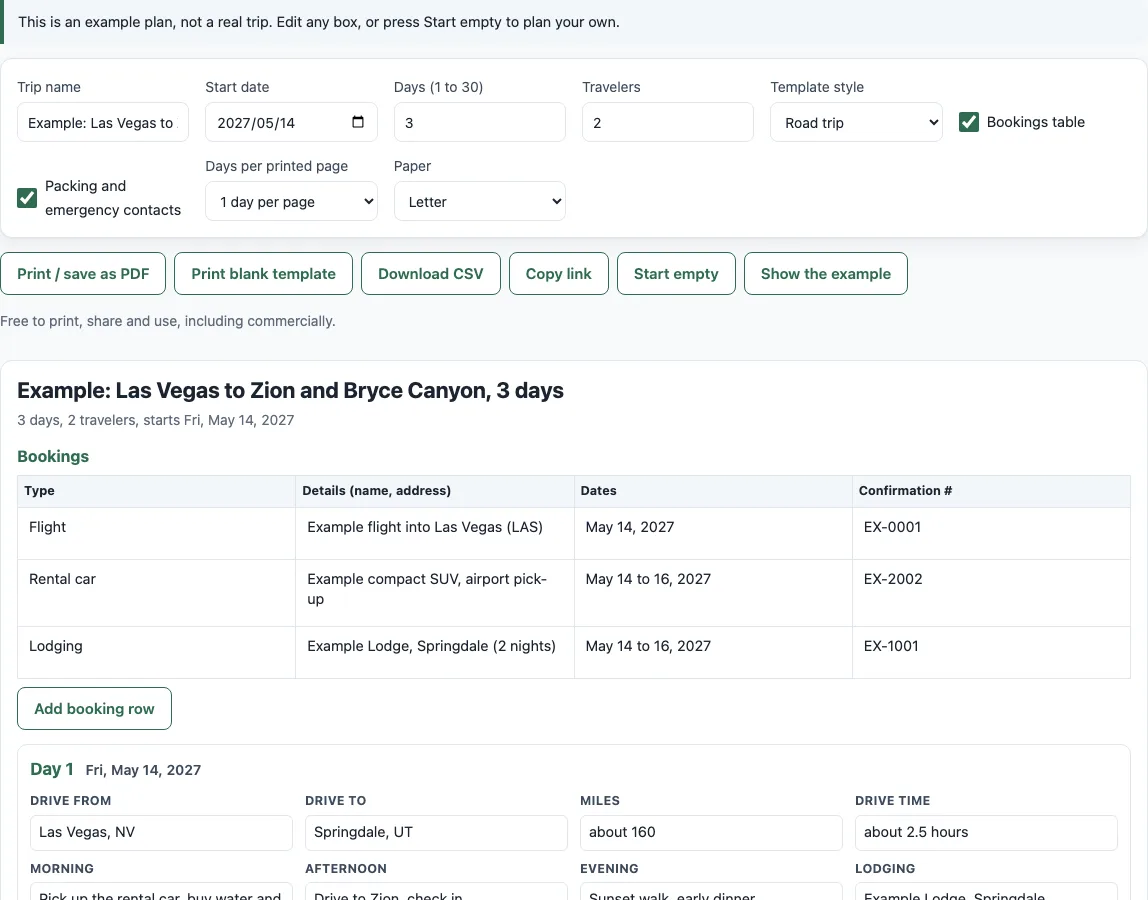
How to use the Travel itinerary template
- Press Start empty for your own plan. To look at a finished sample first, leave the example on the page, or press Show the example to bring it back.
- Type a name in Trip name and pick a Start date.
- Set Days (1 to 30) and Travelers.
- Choose a Template style: Road trip, National park trip or City trip.
- Fill in each “Day N” card. Use the Morning, Afternoon, Evening, Lodging, Confirmation # and Notes boxes, plus the boxes for your style.
- Check Bookings table and add your flights, rental car and lodging. Press Add booking row for more rows.
- Check Packing and emergency contacts and fill in Emergency contacts and Packing and notes.
- Press Print / save as PDF, Download CSV or Copy link.
For printing, choose 1 or 2 days per page and Letter or A4 paper. To print a plan with empty lines for handwriting, press Print blank template. A plan can be shared as a link only if it is under 4,000 characters. This template is free to print, share and use, including commercially.
Every box saves as you type, and the date of each day card changes when you change the start date.
Clear a box by deleting its text.
What should an itinerary include?
A good itinerary lists the date, where you go in the morning, afternoon and evening, where you sleep, and the confirmation numbers for every booking. It also shows travel times and emergency contacts. This template covers each of these in its day cards, bookings table and contacts box.
Is there a free travel itinerary template?
Yes. This page is a free travel itinerary template that you can edit online without signing up. You can also use it as a week itinerary planner or a tour itinerary template by setting the days and filling in the boxes you need.
Can I use it as a vacation or holiday itinerary template?
Yes. The City trip and National park trip styles suit a vacation itinerary template or a holiday itinerary template, and the printed blank version works as an itinerary form template you fill in by hand. For a visit itinerary template, such as a family visit or a school trip, use the Morning, Afternoon and Evening boxes for the schedule and the Notes box for addresses.
How do I make a road trip itinerary?
Pick Road trip as the Template style, then set the start date and number of days. For each day, fill in Drive from, Drive to, Miles and Drive time, then add stops and lodging in the other boxes. The tool does not check routes or traffic, so the miles and drive times are the numbers you type in.
How do I print an itinerary or save it as a PDF?
Press Print / save as PDF, then choose “Save as PDF” in your print dialog. Only the plan prints, because the buttons are hidden. Choose 1 or 2 days per page and Letter or A4 before you print.
Can I get an itinerary template for Google Sheets or Excel?
Press Download CSV and open the file in Google Sheets or Excel. The file has one row per day, then the trip name and travelers, then the bookings table and contacts when they are shown. To put the plan in a document instead, save it as a PDF.
Can I print a blank template to write on?
Yes. Press Print blank template to print ruled empty lines with the same sections as the filled plan. This is useful when you want to plan by hand or carry a paper copy in the car.
Can I share my itinerary?
Press Copy link to copy a link that holds your whole plan. The link works only when the plan is under 4,000 characters. If the page says “Too long to share as a link”, print the plan or press Download CSV and send that file instead.
How long can the trip be?
You can plan from 1 to 30 days. A week itinerary is 7 days. If your trip is longer than 30 days, split it into two plans.
Frequently asked questions
Can I use the printable for commercial purposes or sell it as a printable product?
Yes. You can print, share and use the output for any purpose, including in a classroom or in products for sale, such as printables or print-on-demand books. It is royalty-free and needs no credit. The one limit is that you may not copy the website or tool itself as a competing service.
Is my plan sent to a server?
No. Everything runs in your browser. There is no account, and nothing you type leaves the browser.
Will my plan still be there when I come back?
The plan is saved in your browser after each change, so it should be there when you return on the same device. The example itself is not saved. If your browser does not allow storage, the page tells you that changes are kept only until you close it.
Does the date column handle month and year ends?
Yes. A start date of Jan 30 gives Jan 30, Jan 31, Feb 1 and Feb 2. The tool also handles leap years, so Feb 28, 2028 + 1 is Feb 29. If a date is invalid, the date column stays empty.
Do I need to check park entrance rules?
Yes. Check entrance, timed-entry and shuttle rules on the park’s page at nps.gov before you go. The tool does not state any park rule, and the example plan’s distances and times are rounded sample values, so check your own route.
Is the example a real trip?
No. The example is a sample plan, and its confirmation numbers are fake (EX-1001 and so on). Press Start empty to begin your own plan.
Related tools
- Road trip packing list: to make the packing list that goes with the plan.
- Camping checklist: when some nights of the trip are spent camping.
- Road trip cost calculator: to add up what the planned days will cost.
- Travel budget calculator: to set a budget per person and per day for the trip.
- National parks map: to choose which parks to fit into the days.
- National park entrance fees: to note the entrance fee of each park on the plan.
- Sunrise and sunset calendar: to plan drives and hikes around daylight.